Posts from 2010

Walking for Macmillan


In four week’s time, on the 11th September, Renate and I will be taking part in the Gower Macmarathon Walk from Rhossili to Mumbles. A distance of 22 miles. We’ve set up a page to help collect sponsorship (see widget to right) and hopefully some of my readers, followers, friends and colleagues will be able to contribute.

I’ll be posting more news here and on the JustGiving sponsorship page as I get into training for this event. And I’ll be posting regular updates on twitter and my Facebook page.

Hopefully, 3G coverage and data caps permitting, I’ll be live twitpicing and twitvideoing on the day.

Microsoft Office 2010 (Personalized)

URL: http://www.makeitgreat2010.com/

Office 2010 will be tightly linked with your social networks. Follow this link and login with your Facebook account. It’ll make a promotional video with you as the star and your public Facebook network and photos as the co-stars! Pretty and potentially viral.

Seriously, if MS Office 2010 can deliver, it might be a Google Docs killer!

Caveat: maybe not so great if mobile access only works on Windows phones.

Podcast of the week: #3 Thinking Aloud

Thinking Aloud, a long running BBC Radio 4 show, is a weekly discussion of the latest research in social science. It might seem an odd choice for a lecturer in engineering. But since it’s been a Podcast, I’ve been hooked! It may be the host, Prof. Laurie Taylor, who’s erudition and humour is infectious, but it’s more probably the subject matter. When couched in academic language “discussion of the latest research in social science” seems a dull dry subject. But when framed for an intelligent audience and discussed by Laurie’s guests, usually practicing academics talking about their latest research results, the topics are often fascinating, and generally illuminating.

A few subjects from recent episodes include Japan’s strange love for female robots (rooted in Shinto worship of amina apparently), Oslo drug dealers, choice, lap dancing, and teenage music. As you can see a mixed bag. Like a lot of the BBC’s radio output on “academic” topics, there is a large archive of the show, going back at least 8 years and organized by topic. The latest episode is available as a podcast from iTunes for a week (but there’s not time limit on how long you can keep the recordings … so this is a great resource for teachers). Also for teachers (and learners) there’s an Open University site related to the topics discussed.

If you haven’t been thinking aloud, perhaps you should.

Postscript

Laurie Taylor is also the genious behind the THE’s long running Poppletonian, an official newsletter publshed from a redbrick university’s chalk face. He is also on the after-dinner speaker circuit. I saw him once at a systems engineering conference. Very funny!

Blogged with the Flock Browser

Textbook Alternatives

Last week I wrote a blog posting on the Swansea Learning Lab about the new-to-uk Amazon Kindle and a followup in Reflections about textbook availabilty and prices. I’ve actually been a long term subscriber to O’Reilly’s Safari Books online service (http://www.safaribooksonline.com/) , which for $42.99 (about £27) per month (which includes VAT), gives me access to the entire O’Reilly catalogue as well as many offerings from Addison Wesley, John Wiley and other familiar textbook publishers. Now $42.99 a month is not in the reach of students, but the “lite” offering of a 5 book “bookshelf” subscription for $9.99 might be. And of further interest is that as the books are made available on a web site and there is a mobile version m.safaribooksonline.com that works with mobiles and the Kindle.

Blogged with the Flock Browser

Learning Pedagogy Head First

I’ve been a long-time admirer of the Head First series of books since the dim and distant days of Head First EJB. I have quite a collection of these books myself and often recommend them to students who want to do some self-directed learning, say to learn Java or HTML and CSS.

Every book starts by explaining the pedagogical principles (developed by Kathy Sierra and Bert Bates) behind the books and these principles are enumerated on the Head First labs site.

My question is can these principles be adapted to a lecture course?

I’m going to spend some of the remainder of this summer evaluating a couple of the newer books for one of my modules and I’ll be trying to keep these principles in mind as I do so.

Amplify’d from www.headfirstlabs.com

>

So what does it take to *learn* something? First, you have to *get* it, then make sure you don’t *forget* it. It’s not about pushing facts into your head. Based on the latest research in cognitive science, neurobiology, and educational psychology, *learning* takes a lot more than text on a page. We know what turns your brain on.

>

Head First Learning Principles

See more at www.headfirstlabs.com

See this Amp at http://amplify.com/u/8hpv

More on BBC Mobile

On the theme of mobile web accessibility (#thereisawebappforthat) I did some more exploration of the BBC’s mobile (http://www.bbc.co.uk/mobile) web site and discovered that there is a mobile version of iPlayer at http://www.bbc.co.uk/mobile/iplayer which streams video in MP4 format suitable for the iPhone. Thus, I’d have to regrade the BBC’s mobile accessibility to A+ … providing that you enter the site from the root URL.

In the spirit of research, and because I teach some of this stuff, I dug a little deeper and discovered that if you visit the BBC with a conventional browser, the pages are returned using the XHTML 1.0 Strict doctype and stylesheets are provided for screen and print media with customizations for Internet Explorer 6.

On the mobile site, the doctype is the Wapforum proper subset of XHTML 1.0 (http://www.wapforum.org/DTD/xhtml-mobile10.dtd) and the default stylesheet is tuned for mobile. What we used to call WML and WAP in fact.

Given that there is no conditional code or alternate stylesheets in these pages, I conclude that the BBC web server does some “browser sniffing” on arrival and checks the User-Agent field in the HTTP request. If you arrive at the home page http://www.bbc.co.uk with a mobile you are redirected to the mobile version of the web site. If you arrive at certain parts of the mobile site where there is media, further filtering takes place and “if you’re not on the list, you’re not getting in”.

This strategy works well, and allows the BBC to provide the mobile introduction page http://www.bbc.co.uk/mobile/web/ if you arrive with a conventional browser at http://www.bbc.co.uk/mobile. This page has an embedded mobile emulator and a link to http://www.bbc.co.uk/mobile/index.html/index.html if you insist on going further with a normal browser.

If you examine the URLs in the BBC website, you get a clue as to why linking to a page, say on the news site, in a Tweet might not work for all audiences. Let’s take today’s news article: Honeybees are ‘Cleverer in the Morning’.This is the kind of quirky news headline that I’m sure you’d want to tweet. Indeed, the BBC offers you a sharing button that offers this tweet:

BBC News – Honeybees ‘cleverer in the morning’ http://www.bbc.co.uk/news/science-environment-10892913

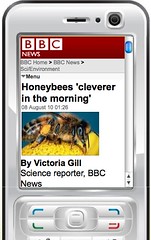
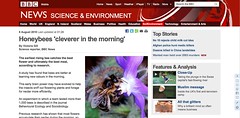
Now, let’s say I receive this tweet on my twitter client (I used Tweetdeck, but Twitterific does the same thing) on my iPhone 3GS and I follow the link. The embedded browser loads the normal news page rather than the more appropriate http://www.bbc.co.uk/news/mobile/science-environment-10892913. The content is identical, but the doctypes, HTML headers and styleshets are different. The actual page (the one that was linked to remember) uses the conventional two column layout, rich navigational options and lots of white space and is tiny on a mobile on nomal (320 pixel wide (illustrated)) orientation and not much better at 460 pixel landscape orientation.

Honeybee story as displayed on mobile with 320 pixels width.

The mobile version stacks the headline, picture (smaller than the one on the main page), byline, article and navigation tools and is designed to work on small resoultion displays and looks great at even 320 pixels.
Honeybee story as displayed on mobile device

The fix is “simple”, expect your clients to reach your web sites from a referal rather than navigation, and do the browser sniffing and redirection everywhere, not just at the top level.

Of course, I write this from the comfortable position of a critic’s armchair. I don’t underestimate the technical problem of creating a fully accessible web site as large as the BBC’s, and they clearly have addressed many of the issues. There are just a couple of grey areas left.

There is a further complicating factor. As examination of the URLs will reveal, the BBC is not one website. It has many websites, spread out across many virtual directories and even across multiple domains (students read virtual hosts). Each one is presumably managed by separate teams and it must be quite difficult to achieve consistent and correct browser-based behaviour across them all. The BBC actually makes for a good case study for my students and I see an assignment coming on!

Blogged with the Flock Browser

Update to BBC Accessibility

Interesting follow-up to yesterday’s mobile web accessibility post (#thereisawebappforthat).

When demonstrating mobile web page accessibility to my wife, I went direct to the BBC web site (http://www.bbc.co.uk). Interestingly, this page recognizes that I was using a mobile device and switched to a presentation suitable for a mobile (See http://www.bbc.co.uk/mobile/web/ for a live demo). Clicking through from here gets you to the news site http://www.bbc.co.uk/news/mobile/ and this is accessible to mobiles. The question is then why doesn’t a link to http://www.bbc.co.uk/news redirect you to the mobile version? Could it be a simple omission?

Incidentally, I wrote this post with the Flock “The Social Browser” blog post editor and the image was auto uploaded and shared from my Facebook account.

Blogged with the Flock Browser

Mobile Accessibility

There should be a web app for that!

Earlier today I tweeted

A bit disappointed to be finding that major media outlets like the BBC make apps instead of making website mobile browser compatible.

After that outburst I felt some explanation was called for. I also felt a campaign coming on. So here goes.

The Explanation

If you have an internet enabled smart phone, then you almost certainly have a mobile web browser. Mine’s an iPhone and the browser’s Safari. Android phones presumably come with a Chrome browser and I assume that Opera is quite popular on other platforms. All these browsers are based on the latest versions of their respective rendering engines and can do a pretty large subset of HTML5, CSS3, and JavaScript. State of the art in other words. This also means that they understand the CSS2 media type property and will therefore honour @media handheld to render a web page optimally for a small screen device.

But I hear you say, why is that important? Surely “there’s an app for that“! Well maybe there is, but consider this common scenario. You’re in your Twitter client on the mobile and you spot a link for an interesting news item on the BBC’s web site. What happens when you click the link? Does your Twitter client say “hey this guy’s got the BBC news app, we’ll use that to display this article”? No, it opens the browser either in the browser app or it uses the built-in browser to render the page in place.

And what gets rendered? The page as it would be rendered for a desktop or laptop machine, that’s what. A page designed to be displayed, in the case of the BBC, with a width of at least 976 pixels (I checked this dimension). A page for which its web designer has not considered accessibility on a screen with a of 480 pixels in landscape mode and only 320 pixels in upright mode.

Now the BBC news app is designed for the iPhone. It looks good and the navigation has been designed to work well on the smaller screen. It makes me wonder how many apps there are that are just customized browsers rather than accessible web sites designed to work well on hand held devices. I know that there are other reasons for having a customized app. Lack of flash on Apple devices forces content providers to provide an alternative. But even here, the widespread support of HTML5 video somewhat obviates even that need.

The Campaign: There Should be Webapp for That

I posit that Content providers should provide web sites that work well in normal browsers! Give us web apps that work better or provide more features by all means, but give us accessible access to the main website as well. (And let’s face it, that should include multimedia!) Let’s name and celebrate those that do and name and shame those that don’t.

Just to be fair, my own institution www.swan.ac.uk fails the test. It’s just about usable in landscape mode without zooming if you have very small fingers and very good eyesight. The same goes for the intranet, which we have control of, and the VLE which we don’t. Also, this blog, admittedly using a standard template, is not particularly accessible on the mobile.

With all that said here is the list of sites that I tried to get to from my Twitter client today that did and didn’t pass the accessibility test:

  • C- BBC News. Frankly unusable without zooming (and video and audio, which is flash, doesn’t work either). There is a free app that overcomes these issues but it’s not callable from another app.
  • A The Guardian. Excellent, recognizes your browser and redirects you automatically to m.gardian.co.uk. No video or crosswords though! The USP for The Guardian app is off-line browsing and access to multimedia — but still not the crosswords!
  • D Scientific American. Looks like the standard web page and is unreadable in any orientation without zooming.
  • A+ YouTube … I know that there’s a standard app for YouTube, but with browser access, the web site redirects you automatically to the mobile version m.youtube.com and videos work.
  • A+ www.w3.org uses @media to switch to a low resolution version as you’d expect!
  • A+ mashable.com uses @media (and possibly JavaScript) to transparently switch to a low resolution version.
  • B apple.com/iphone Surprisingly, this is not optimized for viewing on the iPhone 3GS. Page does seem less cluttered than some sites surveyed, but small print is still too small. Perhaps it looks better on the higher resolution iPhone 4. Video is Quicktime MP4 so it works with Apple’s browser as you’d expect.

Perhaps you’d like to report your experiences in the comments or tweet a link with hashtag #thereisawebappforthat.

**Does this matter?**

If you are throwing your hands up in the air in bemused horror at my pedantic uninformed ranting, let me tell you that *accessibility* is the **principle web design aim** that I drum into my students from year one. From now on, more and more of your audience will be accessing your site and web applications from mobile devices. They shouldn’t be forced to download an app, even a free app, to access your site or service.

My Social Networks: Optimal Sharing(?)

I’m thinking that I need to optimize my social network sharing strategy. Ideally, I’d like to reach the maximum number of people with the minimum effort and I think that I may have too many channels. There is also some duplication that I want to eliminate.

To achieve my aims, I think that I first need to analyze my sharing habits and who sees what I share. This might take several posts to untangle.

**Google Reader**

Let’s start with my primary sharing platform which is Google Reader (GReader). Typically, I’ll read an article that I like and I’ll hit the “share” or the “share with comment” button. Items that I mark this way are immediately available in Chris’s Shared Item page. They also automatically go to my 27 followers (most of whom I do not know!) and, I believe, to my Buzz network. In Buzz, I am following the same people I follow in GReader so I think that Buzz followers must automatically be people you follow in GReader. As I have only 7 followers in Buzz, but they appear in the list of my 27 GReader followers I assume that Buzz followers are a proper subset of my GReader followers. In my feeds, I also get a group of articles from blogs that I follow using the Blogger FriendConnect widget. These folks seem to be in a completely separate social network and would have to follow this blog to see my posts. Unless they actually take the trouble to visit my public Google profile and follow my public GReader Atom sharing link, they are probably unaware that they’re part of my network and won’t see any promotion of their stuff that I might share via GReader. (In fact it’s an interesting question, why, if Google wants to have a social network like Facebook, they have so many seemingly disconnected silos.) From this analysis, it would seem that sharing via GReader is not particularly effective: I have 17 followers, 5 of whom I know and follow back. That said, one presumes that people follow me on GReader because they want to read what I share. I’ve certainly picked up things earlier from my small GReader network than I would from Twitter. For example, this week’s Google Wave story broke from one of the people I’m following in GReader earlier than it did from the “official” media. **Widening My Reach with FriendFeed**

Let’s say that sharing this way reaches the people, the inner circle perhaps, who I definitely would want to reach. What about the wider circle? Well, my GReader shared items get posted to FriendFeed where I have 47 subscribers and 19 subscribees. (Friendfeed is one of my primary aggregators, so I will need to come back to it in a later post.) Assuming, without any detailed analysis, that my GReader followers and my Friendfeed subscribers are mutually exclusive, my primary sharing strategy reaches 64 people.

Can I change my sharing strategy to do better? **Doing Better with Send To**

Short of leaving GReader itself, the only other sharing options I have are the “send to” destinations that GReader provides. In my case these are:

- Send to Friendfeed - Send to Blog - Send to Twitter - Send to Facebook - Send to Posterous - Send to Delicious.

*Send to Friendfeed* is essentially redundant, as items that I share in GReader go to Friendfeed anyway and items shared exclusively with Friendfeed would not be shared with my GReader readers. With this insight, I should probably remove this option.

The others I will explore in later posts.

**To summarize this post**:

Sharing in GReader allows me to follow 23 key GReader and Buzz sharers, around 25 FriendConnect blogs, and of course the hundreds of RSS feeds that come into GReader every day. My sharing from this medium reaches 64 of my followers in both GReader and Friendfeed.

In the next post in this series, I’ll reflect on the *send to* options provided by GReader.

In the meantime dear reader, if you want to comment on your optimum sharing strategy, please use the comments.

Pet rocks and fire hoses

I participated in my first #lrnchat session on Twitter this afternoon. I found it difficult to cope with the volume of information coming in – hence the allusion to fire hoses in the title. While I was composing my next 140 characters of wit and wisdom, 27 messages would scroll by! But I did discover Tweetchat.

There were some stand out moments such as the comparison of Google Wave (topical on the day) with Pet Rocks1 and the comic reflection on the Twitter chat experience: “I once was lost, but now, profound.” Both gems came from @Dave_Ferguson as it happens.

The nice people of lrnchat.com have already posted the transcript, so at least there’s a record and proof that I didn’t just lurk. Thanks to @c4lpt for the initial invitation and the encouragement. I’ll try to be back!

BTW does LOL mean what I think it means?


1 As a European, a British European at that, the allusion to Pet Rocks went over my head. Thank goodness for Wikipedia.