Recent Posts

Things I'm Doing this Week

  1. Learning about Moodle with the help of a couple of books and a lynda.com training course (which is really rather good!)
  2. Watching the recordings of Moodle Moot UK 2011 on YouTube (tag mootuk11)
  3. Signing up for the 2011 JISC Innovating e-Learning online 2011 conference
  4. Thinking about Non-Barking Dogs
  5. Re-evaluating Ning (Elesig) and Cloudworks

And looking forward to migrating some of my Blackboard courses to Moodle.

I have also just downloaded an e-copy of Rethinking Learning for a Digital Age and will be reading it over coffee.

Dennis Ritchie

With the hype following the demise of Steve Jobs, this news item slipped under the radar, and I only picked up the news that Dennis Ritchie has died aged 70, when I listened to the Tech Weekly Podcast of 19th October this morning. Here’s the opening of the Guardian Obit:

“The American computer scientist Dennis Ritchie, who has died aged 70 after suffering from cancer and heart disease, was one of the co-inventors of the Unix operating system and the C programming language. Unix and C provided the infrastructure software and tools that created much of today’s computing environment – from the internet to smartphones – and so have played a central part in shaping the modern world.”

Read more, Denis Ritchie Obituary, The Guardian Technology, 13th October 2011.

It’s hard to quantify just how big an influence Dennis Ritchie and his colleague Ken Thompson, who together invented the C-programming language in parallel with Unix, have had on the technological world we live in. Safe to say, it’s immense and it’s certainly bigger than anything Steve Jobs, who died a week earlier than Ritchie, has left behind. C (and Unix) are not sexy technologies, but they power the Internet and the Web and the influence of the C-programming language has influenced countless modern computing programming languages. And C itself is still alive a kicking and living on a version of Unix that you are carrying in your pocket! See John Naughton’s review of Dennis Ritchie’s legacy Denis Ritchie: The Other Man inside your iPhone in the Observer of 16th October.

Reaching Enlightenment with Ruby Koans

Reached enlightenment in Ruby Koans.

Today I reached enlightenment via the Ruby koans.

Today I completed the “path to ruby enlightenment” with Ruby Koans. Ruby Koans is a test-driven tutorial produced by Edgecase.com that explores some of the basics as well as the darker corners of the Ruby Programming language. It took the best part of 3 days to complete, and was quite challenging in parts. But I’m glad I did it. Thanks to Charles Max Wood’s Teach Me To Code screencast Ruby Koans for the inspiration.

Ruby Koans should preferably be completed on your own computer with an installation of Ruby (mac users have this already installed, windows and linux users have more preparation to go through), a terminal window and a text editor. If you prefer a web version (e.g. on your iPad) there’s an online version.

What is the real reason for doing this? Well I’m working on a web app for undergraduate project allocation and I’m using Ruby for it.

Testing markdown

Just installed extended php-markdown plugin and this post is written in markdown as a test.

Here’s some emphasisstrong emphasis and code.

  • A bulleted list
  • another item

  • A numbered list

  • another item

The code:

Just installed extended [php-markdown](http://michelf.com/projects/php-markdown/)  

plugin and this post is written in markdown as a test.

Here's some *emphasis* **strong emphasis** and `code`.

* A bulleted list
* another item

1. A numbered list  
2. another item  

I’ve turned off the visual editor but WordPress still shows the simple HTML icons. is there anyway to change these so that they insert markdown rather than HTML?

My Top 10 Tools of 2010-11

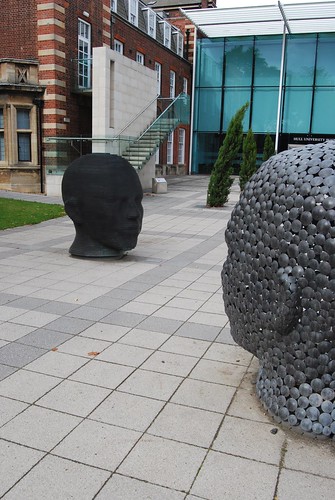
Sculpture at the Business School, University of Hull.

Two heads are better than one.

Helen Davies, one of our Learning Support Team, has put out a call for the annual top 10 tools at Swansea University. A now annual survey that was inspired by Jane Hart’s long-running survey.

As I’ve just come out of a busy teaching term, my list reflects the tools that have dominated my course preparation, delivery and assessment.

  1. My browser (Firefox or Chome used about equally!)
  2. Blackboard – I practically live there in term time!
  3. Camtasia Studio for Mac — the easiest way to do lecture capture screencasts live!
  4. Learning Objects Podcast Tool — the easiest way (in Blackboard) to get your screencasts and lectures on-line.
  5. iPhone – + iTunes for podcasts and screencasts, vital for my own personal learning.
  6. cpjobling.me — my own hosted domain!
  7. WordPress — I’ve moved my blog over from Blogger this year.
  8. DokuWiki — quite a lot of my course materials live here
  9. Perltrees — great for sharing and presenting web sites 10.Diigo — superset of Delicious.

Order is roughly in the order of amount of time spent in each one.

Just outside the top 10 I’d put my Echo smart pen (still has lot of potential I think) and my new Kindle which I’ve used extensively for my own education this year! I also spend an awful lot of time in email and MS Office but not I suspect because it makes me more productive. I’ve just switched from Entourage on the Mac to ThunderBird.

Reflecting on the academic year as a whole I’d say that some of my previous top 10 have dropped out of the charts mostly because of lack of time. However, slideshare, twitter (tweetdeck), facebook, google reader, and google docs still have an important role in my work.

During the PLENK course twitter, facebook, flickr and Moodle made a big contribution to my PLE, but I’ve found myself using social networks less and less as the pressures of teaching and to a lesser extent admin have taken over in 2010-11.

One to watch: Wolfram Alpha and the associated iPhone/iPad apps.
New developments

I’ve just launched a new blog called Crispy Development in which I hope to document my various open-source projects that are hosted on GitHub. This is likely to be on the technical side, and is mostly to help me plan, document and remember stuff. But it may be of interest to someone.

You've got an "ology"?

Zaid Ali Alsagoff shared his discovery of schoology.com at last week’s Wednesday presentation on #CCK11 so I’ve posted the link in a blog post “You’ve got an “Ology”? on the Swansea Learning Lab community blog. We also discussed lecture capture at a pan-Wales meeting today, and I included a postscript about the CCK11 model of meeting capture with Elluminate.

Brits of a certain age, will need no explanation for the title of this post. By way of explanation, for my younger and oversees readers, I include this video, a classic TV ad starring Maureen Lipmann, from before British Telecom became BT,

[youtube https://www.youtube.com/watch?v=P-GABNfhQ1U]