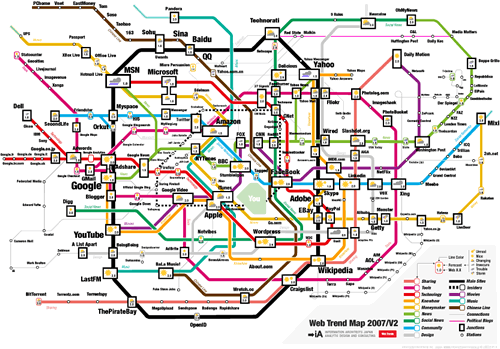
Discovered yesterday in my massive “first-day back” trawl of my RSS feeds was this interesting visualization of the most important web destinations shown as an underground or metro map (actually based on Tokyo’s I believe). One version is a clickable image (with pop-up snap shots of the sites themselves) that you can use as a browser start page which should provide hours of fun. You can also get PDFs that print the map in A3 size as well as the possibilty to buy A2 posters, use it as a desktop image or a screen saver (Mac OSX only!). The map was develoiped by Information Architects, a “strategic design agency” located in Tokyo, Japan.
Comments:

Chris, I'm glad you enjoyed the experience overall. Yes, a tweet chat, like Twitter itself, is a flood. I try and think of it as a river rather than a firehose: I can swim through it, or watch it flow without plunging in, or wander off and come back. As @heraclitus would have been surprised to see, you can step into the same stream again, thanks to search and archive tools. LOL (as Google's probably told you) is "laughing out loud," one of dozens of such shortcuts that emerged in the dawn of online discussion (usenet, IRC, CompuServ, what have you). Your readers may want to know that #lrnchat happens twice a week, on Thursdays, at first at 11:30-1pm EDT/4:30-6pm BST and then again at 8:30-10pm EDT, which is VeryLate:30 BST. More at lrnchat.wordpress.com/about.

I thought everyone had a pet rock at one time Chris! I have always taken LOL to mean Laugh Out Loud myself.

I did too but you never know if those sneaky youngsters haven't made it something rude!