Recent Posts

Software Carpentry and Teaching

I’ve watched and found two videos the week by Greg Wilson to have been very instructive. The first, presented and recorded (slides) at PyCon 2014, introduces lessons learned in developing the Software Carpentry (teaching lab skills for scientific computing) movement. This was slightly revised and presented again at SciPy 2014 (the videos have just gone up on YouTube). I’ve embedded the recording of the latter talk here.

[youtube https://www.youtube.com/watch?v=1e26rp6qPbA?rel=0]Greg’s talks are not really about programming or software carpentry but rather are about teaching and the fact that very little of the large body of research about teaching actually informs what goes on in the class or training room. Ideas and approaches that have been occupying my thoughts recently, like peer instruction, the flipped classroom, collaborative work, inquiry based learning, open educational resources, open access and open source all feature and I may have more to say as I digest the background materials over the summer.

Well worth a look!

#GEUG14 @ The University of York

There is a Google Apps for Education User Group running today at the University of York. There are live hangouts to be found on YouTube (search for GEUG14) and here is the Twitter feed for: #GEUG14 Tweets!function(d,s,id){var js,fjs=d.getElementsByTagName(s)[0],p=/^http:/.test(d.location)?'http':'https';if(!d.getElementById(id)){js=d.createElement(s);js.id=id;js.src=p+"://platform.twitter.com/widgets.js";fjs.parentNode.insertBefore(js,fjs);}}(document,"script","twitter-wjs");

#ocTEL 2014: Activity 0.1: Big and little questions

I’ve just joined the 2014 (second) run of the Open Course on Technology Enhanced Learning that is being supported by the Association for Learning Technology (ALT). You should expect to see the hashtag #ocTEL in my posts on this site until mid June, but hopefully that will be compensated for by an increase in activity and reflection.

Amongst the Week 0 (induction) activities we are asked to

reflect on your work experience and ambitions for developing your teaching

and

Can you identify the most important question about TEL that matters to you?

Here is my answer.

I consider myself an early-adopter of technology enhanced learning (TEL) technologies and I am always trying new things: but my weakness is that I am very bad at evaluating the technologies that I use. I tend to favour those technologies that make my life easier as a teacher but am aware that these may not be the ones that are most effective for my learners.

I have yet to find an effective way of reflecting on and evaluating the technologies that I use. As a lecturer rather than a learning technologist, I suppose that I give myself the excuse that I’m too busy creating course activities, delivering courses, assessing students and giving feedback, to be reflective during the module delivery. The student evaluation systems we have at my institution are not tuned to give me feedback on our uses of the technology, and the only real metrics we can reliably gather are the statistics around module outcomes. Frustratingly, in the off-time between sessions, more and more time seems to be spent with the administration processes around annual module and programme monitoring, module and programme maintenance, timetabling etc. So time and space to reflect on even this limited data is inadequate.

I would reinforce Sue Beckingham’s question

How do we get to a point where staff development is something time planned in and achievements are recognised?

by stating that my institution’s processes do not provide support for this either in its somewhat mythical staff loading models nor in its professional development processes.

Like most institutions, we are being driven by student experience so the little questions I have are around effective feedback and assessment methods, particularly in large group contexts, student engagement, and metrics.

Assignment submission links

In Blackboard, the title of an assignment submission is black and it looks like an ordinary heading. When you mouse over it, the underline appears and it looks like a link. But if you just look at it, it’s not obvious that it is a link! In response to feedback, I’ve now changed the colour of my assignments to dark blue. (See example).

Colour assignment title so It Looks More Like a Link

Colour assignment title so It Looks More Like a Link

I’ve also added a textual note below the link to make it extra clear and I’ve provide a web link to the Blackboard help page on Assignment Submissions for students.

The blue in my link is a bit too light when compared to the attachments on the item, so if anyone knows what the CSS colour code for a link should be, I’d be grateful if you could add it to the comments.

Supporting the Seven Principles with Blackboard Learn

[youtube https://www.youtube.com/watch?v=Yb4XDzjPS_4]I attended a Blackboard Innovative Teaching Series webinar on Monday which discussed how Blackboard Learn can be used to support Chickering and Gamson’s Seven Principles for Good Practice in Undergraduate Education [1]. This was a very nice presentation from Ronald Scott Wennerdahl and Crystal Sheu of the Faculty of Fine and Applied Arts at the University of Illinois at Urbana-Champaign. And there are some good ideas that I will need to think about in relation to my own teaching coming up next semester. The video has just been published on YouTube.

Reference

[1] Chickering, Arthur W. and Gamson, Zelda F, “Seven principles for good practice in undergraduate education” American Association of Higher Education Bulletin vol.39 no.7 pp.3-7 1987. URL: http://www.aahea.org/aahea/articles/sevenprinciples1987.htm

Comments:

Alan Levine -

The end result of design by software engineers? Maybe when Google is done re-imagining email, they can re-fabricate discussion forums. I get dizzy whenever discussion forums are mentioned. In a time when they were the only way to communicate to a large group online, it was like magic. Now it often ends up like a sprawling mess of fallen spaghetti. Features are functionality are important, and can help some, but I dont think is the complete answer. What is? If I knew, I'd be making it....


Chris Jobling -

Alan, I noticed that connected courses (#ccourses) is using discourse ... does that work better?


Alan Levine -

There is a lot to like about discourse, Chris, or perhaps less to dislike. It's clean, elegant, and has a lot of the features you found shortened on (and then some). I still deal with a real pit in my stomach aversion for forums, and its not the features/technologies. They were super vital when they were really the only mode to have a community conversation, but now the locations for where people put their attention is in many places. Forums take focused attention, frequent tending/attention and often (to me) just feel like idea sprawl; it becomes an unwieldy pile. But I would recommend it highly if you are looking for something that was not designed with a 1980s BBS mind set.


The Course Description

Having dealt with the reading list, my next consideration was the course description. This has been published in the course catalogue so I have to stick to the sense if not the letter of the published description.

Here’s what the catalogue entry currently says.

EG-247 Signals and Systems

Module Aims

To develop further methods of representing and analysing dynamic systems, to extend these concepts to sampled-data systems, to introduce concepts in signal processing and to use computer-aided methods for modelling and analysis.

Module Content

  • Review of signal representations and transform concepts.
  • Harmonic responses, parametric plots, logarithmic measures for linear systems.
  • Laplace domain representations and corresponding time responses.
  • Fundamentals of Fourier series, DFT from FT.
  • Fundamentals of Sampled data signals, digital systems, z-transforms, responses and FIR digital filters.
  • Implementations of IIR and FIR pulse transfer functions.

Delivery

Lectures, Matlab practicals and examples classes.

Intended Learning Outcomes

After completing this module you should be able to: • Construct harmonic response diagrams in standard form

  • Construct pole-zero diagrams and derive associated responses
  • Determine system responses for given standard inputs
  • Discuss the nature of analogue and digital signals and systems
  • Describe the different forms of Fourier representations
  • Derive the Fourier representations of simple signals
  • Apply the DFT to simple sequences
  • Determine the response of digital systems to standard inputs
  • Design FIR digital filters and describe their implementation

Transferrable Skills

On successful completion of the module, students should be able to show experience and enhancement of the following key skills:

  • Independent learning
  • Problem solving and design skills based on mathematical modelling and analytical approaches

Assessment

  1. Examination (80%)
  2. Continuous Assessment (20%)

As I am taking over the course, this has to be my starting point. If I was developing a new course, I’d have gone through a process of development and module approval within my Board of Studies and Committee and College Learning and Teaching committee, and the programme description would still be my starting point.

This information is automatically added to the Blackboard site for my module by my institution. It is extracted from the course catalogue and automatically populates the Module Information page. Therefore, if I need to make changes, I have to do it on the Course Catalogue.

Setting Up the Reading List

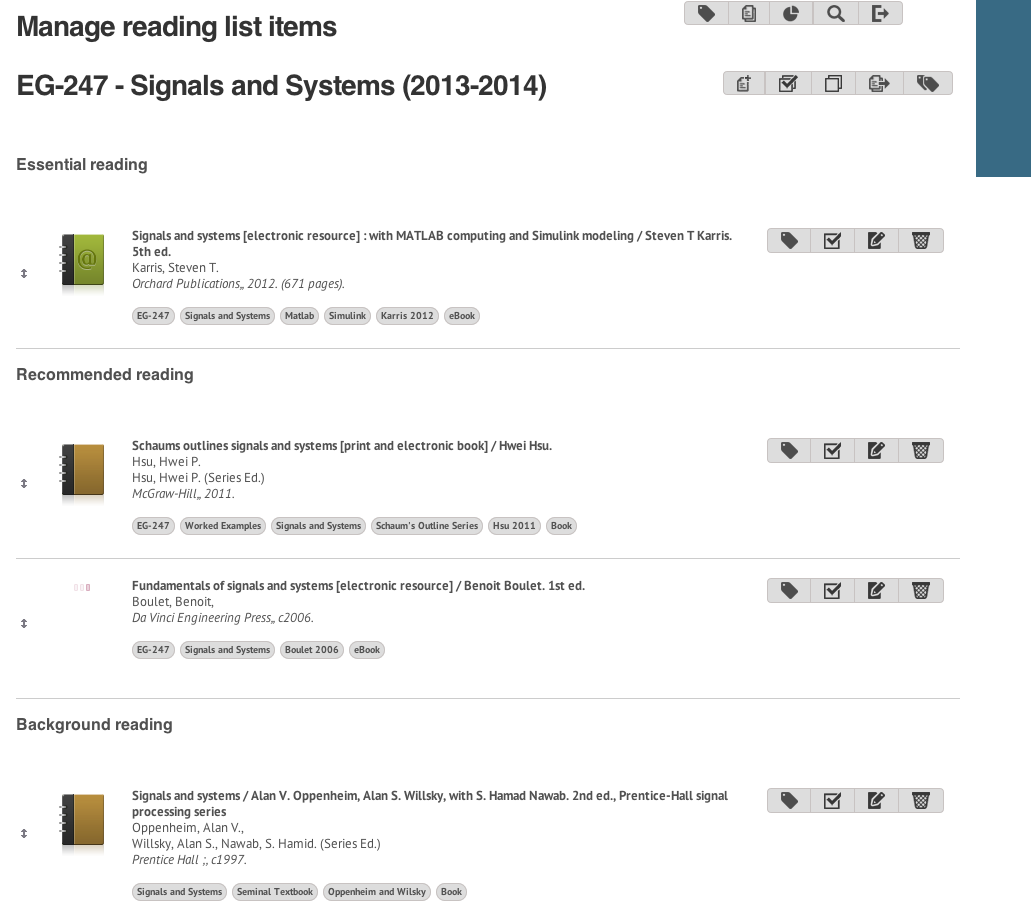
The course reading list as it appears in the admin screen on iFind Reading

The course reading list in iFind Reading

My second step in setting up my new module was to update the reading list.

There are a large number of books on Signals and Systems and some, like the ones recommended by my colleagues last year, are considered seminal. However, they are also very expensive and available in the library in small numbers and only on short-term loan. They also take a somewhat mathematical approach to the subject.

One of my aims for the course is to attempt to make it more accessible to my students by taking an applied approach to the material. I also want to make use of Matlab and Simulink both for illustration in class but also for homework exercises and as a project. On searching the library, I was surprised to find that there are two good e-book offerings, one of which takes exactly the approach that I want to explore. These books have replaced the original texts in the reading list as Essential and Recommended reading. The original texts have been relegated to Background reading. The eBooks are free for Swansea students to use and have no limitations of the number of students who can access them at a time. They do have the disadvantage that they have to be used via web browser but that’s a small price to pay for the cost.

(The actual value of the eBooks and the restrictions on their access imposed by their licensing will be something I may need to come back to.)

I’ve also added a couple of open educational resources to the reading list. One of these was the on-line text book from connexions.org used by my colleague last year. The other is a wikibook on signals and systems that is also free.

The one none-free book that I’ve added to my Recommended reading list is a Schaum’s Ouline Series book on Signals and Systems. These books are full of worked examples and I’ve been a fan since I was a student myself. At £11.99 RRP (cheaper on-line) for the Signals and Systems book it’s a small price to pay for such a great revision aid.

To help me to refer to the books in the reading lists, I have tagged them with the course code and course title, the keyword Matlab if appropriate and the author & date.

In our institutional set-up, all this information is added automatically to our Blackboard sites as a Reading List menu item. It is also used by the Librarians to ensure that we have books in stock, etc. Local colleagues wanting to find out more about how the iFind Reading Lists work, should visit the iFind Reading pages on Blackboard.

Building a Course Site in Blackboard: Part 1

Course notebook

This year I am taking over a module EG-247 Signals and Systems from a colleague who has moved to another institution. This is the first of a series of Blog posts with which I intend to document and reflect on the process for my own benefit but in the hope that it will be useful to others.

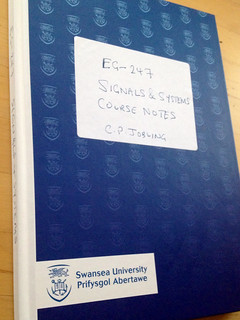
My first step this year was to buy a hard-backed notebook. There are some nice ones with Swansea University livery in the Campus bookshop for £4.95. I’ve added a label for the course title. I’ll use it to write down my own notes as I go through the reading and jot down my ideas for the module structure and lesson plans.

Should I....?

Should I?

Heads by Chris Jobling

I’ve got a new module to deliver this session. I wonder if documenting the process of putting together the course site on Blackboard would be of interest to anyone?

Feedback in the comments please.

Walking in Your Student's Shoes: Online Collaborative Experience

Einstein Agrees with Brian

Einstein Agrees with Brian, mashup by Andrea Arbogast “interlect” on Flickr. Image licensed under Creative Commons share alike with attribution. Some rights reserved.

In recent times, the Blackboard company has been reaching out to its community of institutional users via a series of weekly webinars in what it calls the Blackboard Innovative Teaching Series (BITS). It hosts and records these webinars on Blackboard Collaborate and then releases the recordings on the BITS Channel on YouTube.

Today, I watched episode 27 entitled Blackboard and the Online Collaborative Experience. On show was a three-week on-line course created for staff professional development by the Instructional Designers David Flora, Ericka Hollis, and Xavier Scott of Morehead State University. They demonstrated the use of Blackboard Learn’s collaborative features to get instructors to actively engage with Blackboard’s collaborative features (blog, discussion board, wiki, Blackboard Collaborate) in order to experience what it might be like for students to experience active learning through collaboration. The resulting course has also been awarded one of Blackboard’s exemplary course programme awards and you can self-enrol as a student and view the course site at ecpgallery.coursesites.com (direct link).

As my institution is still climbing the early majority part of the adoption curve, with most of my colleagues using the VLE (which is Blackboard Learn) as a complex Content Management System (CMS), running such a course here might be well worth considering.

The rest of the recorded BITS series is well worth a look and you can sign up for the upcoming live webinars as well: there’s a few good ones coming up in November including Accessibility (14th November), Assessment and Feedback (18th November) and the Flipped Classroom (9 December). They take place at either 11:00 am or 1:00 pm EST (currently 3:00 and 5:00 pm UK time). Perhaps I’ll see you there!